OpenRouter 对比四家 AI Agent 服务端代码执行沙箱工具
Server-Side Code Execution Tools for AI Agents, Compared
OpenRouter 发文比较 OpenAI、Anthropic、Google 与 OpenRouter 四家的服务端代码执行工具,介绍各自沙箱的语言、网络、持久化与计费差异,并推出处于 beta 的 openrouter:shell 与 openrouter:bash 工具,可在 Responses 和 Messages API 上为任意模型运行命令。
Say you’re building an agent that answers questions about a CSV a customer uploaded. The model needs to run Python to get the answer. Where does that code run?
One option is to run it yourself. That means a sandbox platform such as E2B or Modal, or your own container on Docker, plus the work of keeping it away from your database and the internet, capping its runtime, and patching the image.
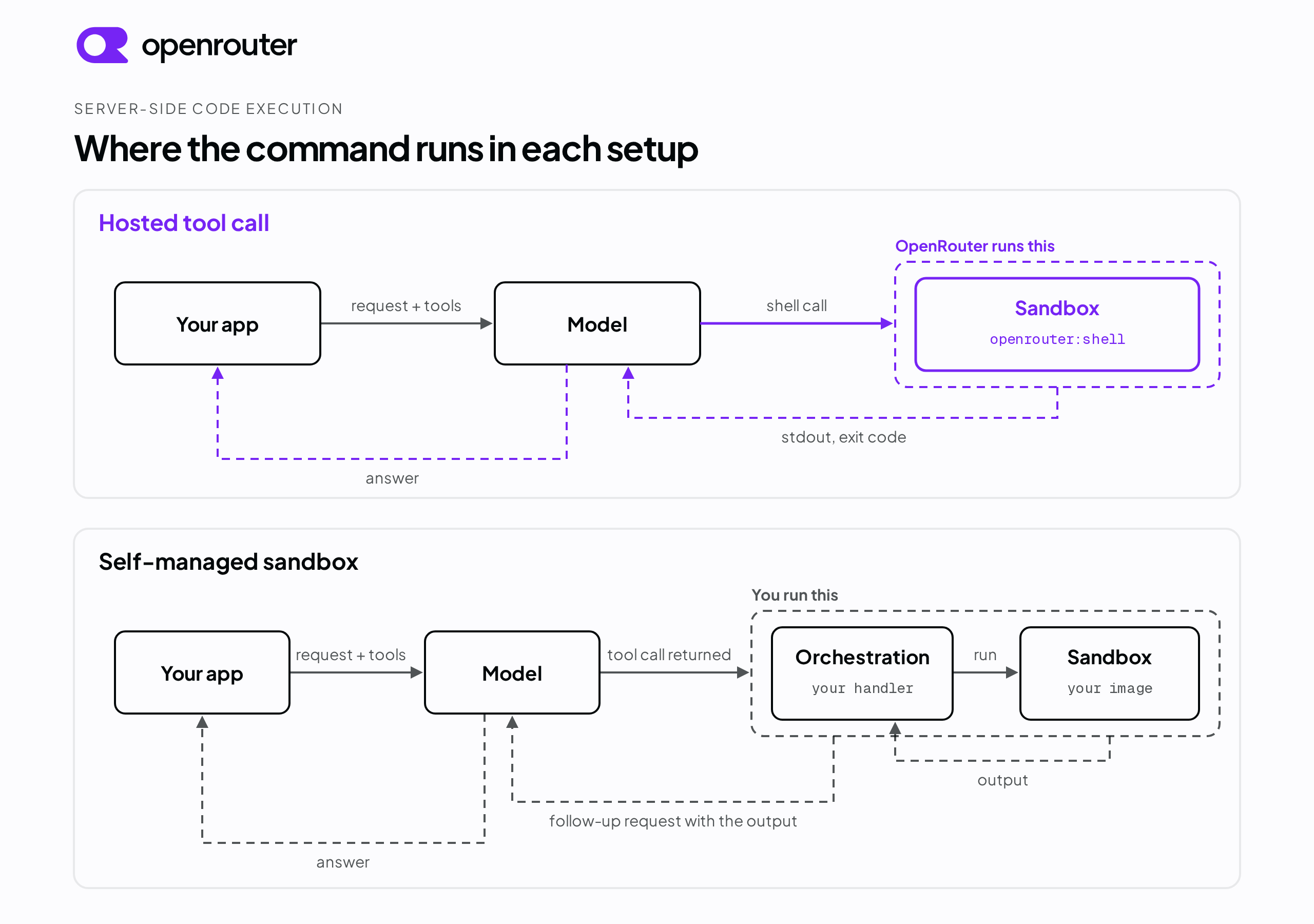
A server-side code execution tool is the other option. You add the tool to your API request, the model decides when it needs to run something, and the provider runs the commands in its own sandbox and returns the output to the model inside the same request. A sandbox here means an isolated Linux container with its own filesystem, a time limit, and no network access by default.
This article covers four providers that offer server-side code execution today, what each sandbox can and can’t do, what it costs in latency and money, and the jobs that still need a sandbox you operate yourself.
Tl;dr
- A server-side code execution tool runs the model’s commands in the provider’s sandbox during your API request. You don’t provision, patch, or secure a container.
- OpenAI, Anthropic, and Google each run code for their own models. Our openrouter:shell tool runs commands for any model on the Responses and Messages APIs, and our openrouter:bash tool does the same on the Messages API only. Both tools are in beta.
- Our sandbox is an isolated container scoped to your account and workspace, with outbound network access off by default and per-command limits on runtime and output size. Sandbox time is billed at $0.0001 per second with a 30-second minimum for a new or sleeping container.
- A sandbox platform you operate yourself is still the right choice for a custom base image, GPU work, or a session that runs for hours.
What server-side code execution means
A model never runs anything itself. When it calls a tool, it emits a request naming the tool and the arguments, and something has to carry that out. With a client-side tool, that something is your application code or the agent framework you build on. Your application receives the call, runs it, and sends the result back in a follow-up request. With a server-side tool, the provider runs the call on its own infrastructure and returns the result to the model in the same request, so your application has no handler for it. Server-side code execution is the second kind.
You may already use tools that work this way. Web search lets a model look something up on the live web, and web fetch lets it read the contents of a URL. In both cases you add one entry to the request and the provider does the rest. Code execution applies the same pattern to running commands.
How a tool call becomes a command that runs
These steps apply to any server-side code execution tool. Where a field name appears, it’s the one our shell tool uses.
- You include the tool in the request’s
toolsarray. - The model decides it needs to run something and emits a call carrying one or more shell commands.
- The provider runs those commands in order inside a sandboxed container.
- Each command’s standard output, standard error, and outcome go back to the model. The outcome is either an exit code or a timeout.
- The model reads the results and either answers you or runs more commands in the same request.
Steps two through five repeat until the model answers. The model runs something, reads the output, decides whether it needs another command, and goes again. That loop is where a code execution tool earns its place, because the model can check its work against real output instead of guessing.
We cap that loop. The max_tool_calls field sets how many server-tool steps one request may take. Our server tools reference puts both the default and the maximum at 30.
How a hosted sandbox differs from one you run yourself
Running your own sandbox means owning the parts the provider would otherwise own. You pick a base image, provision the compute, wire in an SDK to start runs and read output, and manage each run’s lifecycle. You also own the security boundary.
A hosted tool trades that control for one entry in a JSON array. You don’t size the container, patch it, or operate it. We built openrouter:shell for the case where the work is a handful of short commands per request.
Who offers hosted code execution today
This article covers OpenAI, Anthropic, Google, and OpenRouter. Agent SDKs and dedicated sandbox platforms are separate categories, and both come later in the article. What separates the four providers is which models each one runs code for.
OpenAI runs a hosted shell for OpenAI models
OpenAI’s shell tool runs commands in a container OpenAI manages, on the Responses API. OpenAI documents the hosted runtime as Debian 12 with a default working directory of /mnt/data. Commands run without sudo, and interactive TTY sessions aren’t supported. Preinstalled languages listed in the documentation include Python 3.11, Node.js 22.16, Java 17, PHP 8.2, Ruby 3.1, and Go 1.23.
Hosted containers have no outbound network access by default. To enable it, an organization admin configures an allowlist in the OpenAI dashboard and you set network_policy on the container environment in the request. A container can be reused across requests by passing its id in a container_reference environment, and its expiry is set when the container is created. OpenAI also has a separate code interpreter tool for Python.
Anthropic runs Python and Bash for Claude models
Anthropic’s code execution tool runs Python and Bash in a sandbox Anthropic manages, on the Messages API. The documented environment is a Linux x86_64 container with Python 3.11, 5 GiB of RAM, 5 GiB of workspace storage, and one CPU. Internet access is disabled and no outbound connections are permitted, so Claude works with the preinstalled libraries and can’t install a package during a run.
Three tool versions exist, and every supported model accepts all three. code_execution_20250825 supports Bash commands and file operations. code_execution_20260120 adds Python interpreter state that persists between requests, which depends on Anthropic’s programmatic tool calling and isn’t available on Claude Haiku 4.5. Containers expire 30 days after creation. After about 5 minutes of inactivity a container is checkpointed, and a request with its id inside the 30-day window restores it.
Google runs Python for Gemini models
Google’s code execution tool runs Python in a sandbox Google manages, enabled with a code_execution entry in the request’s tools. The documentation states that the model can only generate and execute Python, that the code environment has a maximum runtime of 30 seconds, and that you can’t install your own libraries. Google publishes the list of libraries the environment includes.
We run a hosted shell for any model
The three tools above each work with one company’s models. Ours works with any model on the Responses and Messages APIs, because we run the sandbox at the routing layer rather than inside one model provider.
We ship two code execution tools. openrouter:shell mirrors the shape of OpenAI’s hosted shell tool and works on both the Responses API and the Messages API. openrouter:bash mirrors the shape of Anthropic’s bash tool and works on the Messages API only.
Both tools are in beta, so the API may change. Sandboxed execution runs on the global openrouter.ai endpoint only. The in-region endpoints don’t offer the shell tool, and Chat Completions rejects both tools with a 400 that names the APIs that do support them.
Set engine to openrouter on either tool and the commands run in our sandbox. The default engine is auto. For openrouter:shell, auto keeps a provider’s native hosted shell where one exists and routes to our sandbox otherwise. For openrouter:bash, auto returns the tool call to your application to run client-side, and nothing executes on our servers.
Run a command in our sandbox
Here is a complete request that runs two commands and reads the results back.
import os
import requests

response = requests.post(
    "https://openrouter.ai/api/v1/responses",
    headers={"Authorization": f"Bearer {os.environ['OPENROUTER_API_KEY']}"},
    json={
        "model": "anthropic/claude-sonnet-4.5",
        "input": "Run `cat /etc/os-release` and `python3 --version`, then tell me the OS and Python version in one sentence.",
        "tools": [
            {"type": "openrouter:shell", "parameters": {"engine": "openrouter"}}
        ],
    },
)

for item in response.json()["output"]:
    if item["type"] == "openrouter:shell":
        print(item["container_id"], item["action"]["commands"])
        for result in item["output"]:
            print(result["stdout"], result["outcome"])
We ran this request on September 22, 2026. The model sent both commands in one shell call, and each command came back with its own outcome. The full os-release output runs to several lines and is trimmed to its first two here.
{
  "type": "openrouter:shell",
  "container_id": "sess_art10-418b8597e044",
  "action": { "commands": ["cat /etc/os-release", "python3 --version"] },
  "output": [
    {
      "stdout": "PRETTY_NAME=\"Ubuntu 22.04.5 LTS\"\nNAME=\"Ubuntu\"\n",
      "stderr": "",
      "outcome": { "type": "exit", "exit_code": 0 }
    },
    {
      "stdout": "Python 3.11.14",
      "stderr": "",
      "outcome": { "type": "exit", "exit_code": 0 }
    }
  ]
}
The sandbox reported Ubuntu 22.04.5 LTS with Python 3.11.14 on that date. The runtime image can change, so read the version from the container rather than hard-coding it. The server tools reference covers the remaining parameters.
Agent SDKs that wrap a sandbox for you
If you build on an agent SDK rather than calling an API directly, some SDKs wrap one of these tools.
The OpenAI Agents SDK ships CodeInterpreterTool, which runs code in OpenAI’s sandbox, and ShellTool, which runs either in your local runtime or in an OpenAI-hosted container depending on how you configure its environment. Check which mode you configured before assuming a command ran remotely. On our side, openrouter:shell is an entry in the tools array like any other, so it goes into an OpenRouter Agent SDK loop the same way it goes into a raw request.
What still needs a sandbox of your own
A hosted tool fits short, bounded work such as running a script, transforming a file, or checking a result. Anything that needs a specific base image or a GPU falls outside all four hosted tools and needs a sandbox platform you operate.
Comparison
Every hosted-tool cell comes from the vendor’s own documentation linked above, except the OpenRouter runtime cell, which is what the sandbox reported when we ran the request above. The self-managed column describes a sandbox you run yourself rather than any one platform.
| OpenRouter | OpenAI | Anthropic | Self-managed | ||
|---|---|---|---|---|---|
| Who runs it | We do | OpenAI | Anthropic | You do | |
| Models | Any model on the Responses and Messages APIs | OpenAI models | Claude models | Gemini models | Any model |
| APIs | Responses and Messages. openrouter:bash is Messages only | Responses | Messages | Gemini API | Any |
| Languages | Any shell command. Ubuntu 22.04.5 with Python 3.11.14 reported on September 22, 2026 | Shell commands on Debian 12. Python, Node.js, Java, PHP, Ruby, and Go preinstalled | Python and Bash | Python only | Whatever you build |
| Filesystem | Own container filesystem, scoped to your account and workspace. Files under the home directory are saved after every command | Own container filesystem with a default working directory of /mnt/data. Data is deleted when the container expires | Isolated container with 5 GiB of workspace storage. Containers expire 30 days after creation | Not documented | Whatever your image and mounts define |
| Outbound network | Off by default. Allowlist of up to 50 hostnames on ports 80 and 443 | Off by default. Organization allowlist plus a per-request network_policy | Disabled | Not documented | Yours to configure |
| Install packages at runtime | Yes, with the package hosts in the allowlist | Yes, with the package hosts in the allowlist | No | No | Yes |
| Session persistence | Container keyed by container id. Sleeps after 5 minutes idle. Saved files kept for 30 days after last use | Container reused by id through container_reference. Expiry set on the container | Container restored by id within 30 days of creation. Interpreter state persists on code_execution_20260120 and later with programmatic tool calling | 30-second maximum runtime per execution. State persistence between requests not documented | Up to each platform’s cap |
| Cost model | Inference tokens plus sandbox time at $0.0001 per second, with a 30-second minimum for a new or sleeping container | Not stated in the shell tool documentation | 1,550 free hours per organization per month, then $0.05 per hour per container, with a 5-minute minimum per execution | No added charge. Generated code and output billed as tokens | Compute time while the sandbox runs |
What our sandbox enforces
The point of a sandbox is that you don’t have to trust the model. A command you never intended can’t reach the network or anyone else’s container, and it stops at a hard limit on how long it runs and how much it prints. Everything in this section describes our sandbox. The table above shows where the other three differ.
The limits that apply to every command
We run each command in an isolated container, separate from the infrastructure serving your request and from your machine, and scoped to your account and workspace. You set your own ceilings with timeout_ms for how long a command may run and max_output_length for how much it may print. timeout_ms defaults to 120,000 ms and can’t exceed 300,000 ms. max_output_length defaults to 16,384 characters per stream and can’t exceed 65,536. A shell call with more than 100 commands is rejected.
Outbound network access is off unless you turn it on. We checked this on September 22, 2026 by sending a request with no network_policy and asking the model to fetch https://example.com with curl, printing only the HTTP status code and giving up after 5 seconds. The command printed 000, which is what curl prints when no response arrives, and exited with code 28, a curl timeout.
{ "stdout": "000", "stderr": "curl: (28) Failed to connect to example.com port 443 after 5206 ms: Connection timed out", "outcome": { "type": "exit", "exit_code": 28 } }To open the network, set a network_policy allowlist of up to 50 hostnames or glob patterns. Only ports 80 and 443 are reachable, and the policy is fixed when the container starts. pip install needs both pypi.org and files.pythonhosted.org in the allowlist.
Prompt injection and what the sandbox limits
Giving a model a shell exposes you to prompt injection. If your agent reads a web page, a support ticket, or a file someone uploaded, an attacker can hide instructions in that text telling the model to ignore your prompt and run something else.
The limits above apply whether the model is following your prompt or an attacker’s. A command run under an injected instruction can’t reach any host outside the network_policy you configured, and has no network access at all when you leave the policy off. It can’t reach another tenant’s container, and it stops at the same timeout. An allowlist widens what an injected command can reach, and allowed_domains: ["*"] permits unrestricted egress, so keep the allowlist to the hosts the job needs.
You can also detect an attempt that arrives in the request itself. Prompt-injection detection in a workspace guardrail checks the user-supplied message content of each incoming request against regex patterns for common injection techniques, before we forward the request to the model. It doesn’t inspect what a server tool fetches after that point, so a page, file, or command output the model reads through a tool needs a control of your own, such as reviewing the sandbox output your application receives. A match does one of three things, depending on the action you configure.
- Flag records the detection and forwards the request unchanged.
- Redact replaces the matched span with
[PROMPT_INJECTION]and forwards the sanitized request. - Block rejects the request with a 403 before it reaches the model.
Where more than one guardrail applies, the strictest action wins, in the order block, redact, flag. The detection isn’t exhaustive and can produce false positives, so measure the match rate against your own traffic in flag mode before you enforce redact or block. You can report a false positive from the Logs page.
What a hosted sandbox costs you in seconds and dollars
A hosted sandbox adds seconds to a request and leaves you with no infrastructure to run. It also gives you a container you can return to.
Files survive between requests
Commands run in /workspace/home, and we save the changed files under that directory after every command. Send a stable session_id, or set a container id in the tool’s environment configuration, and every request with that id reaches the same container and the same files. A session_id must use only letters, digits, _, and -. An id with any other character is ignored, and we pick the container as if you sent no session_id, which means the most recent container_id in the replayed conversation if there is one, and otherwise a new container for that request. When a session_id is longer than 20 characters, we use only the last 20, so two long ids that end the same way share a container. A container_reference id can be 1 to 40 characters from the same set and isn’t truncated, so use it when you need the id to be exact. We confirmed this on September 22, 2026 by writing a file in one request and reading it back in a second request that shared the same session_id.
A container sleeps after 5 minutes idle, and the idle time isn’t configurable. Sleep doesn’t delete the files. When a request with the same id arrives later, a new sandbox starts and loads the saved files first. Open processes, environment variables, and installed system state aren’t restored, so treat a woken container as a fresh machine that has your files on it. Saved files are kept for 30 days after the container was last used. To pull an artifact out, GET /api/v1/containers/{container_id}/files lists what a container produced, and the promote endpoint copies a file into your workspace documents, where it doesn’t expire.
What you can review afterward
Each shell tool result in the response carries the commands the model ran and each command’s stdout, stderr, and outcome, so your application can log them the same way it logs the rest of the response. Input & Output Logging stores your prompts and completions on OpenRouter for review on the Logs page, and guardrail detections appear there too. For production monitoring, Broadcast streams traces to an external observability platform as requests complete.
If you route in-region, the shell tool isn’t available and Input & Output Logging is skipped, even when it’s enabled. Broadcast supports in-region routing, and each destination is configured with the data regions it receives traces from.
What the round trip costs you
A request that runs a sandboxed command takes longer than the same request without one. In a set of single requests we sent on September 22, 2026, a request with no shell tool returned in about 2 seconds, and requests that made one shell call returned in 8 to 21 seconds depending on the model. Those are single samples from one session, not a benchmark. Budget for several seconds of overhead per shell call.
Sandbox time is billed at $0.0001 per second. The clock starts when a request first runs a sandbox command and stops when the response completes. A request that starts a new or sleeping container is billed a minimum of 30 seconds, and later requests that reuse the same warm container pay only their metered time. The request above started a new container, and its usage object reported a server_tool_cost of 0.003, which is the 30-second minimum. A container that is idle between requests isn’t billed.
Change the model without touching your tool code
Swap the model and your tool definition stays the same.
We sent one request body six times on September 22, 2026, changing only the model field, and asked each model to run python3 -c "print(sum(range(1, 101)))" in the sandbox. Each model made one shell call and returned 5050.
| Model | Result |
|---|---|
| openai/gpt-5.4-mini | 5050 |
| google/gemini-3.5-flash | 5050 |
| anthropic/claude-haiku-4.5 | 5050 |
| deepseek/deepseek-v3.2 | 5050 |
| moonshotai/kimi-k2.6 | 5050 |
| qwen/qwen3-coder | 5050 |
All six ran in the same sandbox with the same tool definition, whatever their own provider offers natively, because the sandbox belongs to us and not to the model’s provider. Test the model you plan to use before you build on it, because tool-calling reliability differs between models. Our tool calling guide covers how server tools and your own function tools share one tools array.
When you want a sandbox platform of your own
Choose a dedicated sandbox platform when you need something a hosted tool doesn’t give you. Modal documents sandboxes built from custom images with a configurable lifetime of up to 24 hours and GPU resources. Daytona documents sandboxes created from a public container image, including GPU sandboxes. E2B documents sandboxes that run for up to 24 hours on its Pro plan and 1 hour on its base plan, with pause and resume for longer workloads.
Conclusion
For short, bounded commands inside a model request, use a hosted tool. You add one entry to the tools array and get an isolated container with outbound network access off, and you pay for inference plus the seconds the sandbox runs. Budget several seconds of overhead per shell call and reuse a container where you can.
Move to a sandbox platform you operate when a job needs a custom base image, a GPU, a session that runs for hours, or ownership of the security boundary itself. In either case, check the provider’s current documentation before you commit, because our two tools are in beta and the other three providers’ tools change too.
Frequently asked questions
Is there a hosted sandboxed shell tool that models can call directly during a request?
Yes. Our openrouter:shell server tool gives a model a sandboxed Linux shell that runs on our infrastructure during the request, on both the Responses API and the Messages API. Set engine to openrouter and the commands run in an isolated container, with each command’s stdout, stderr, and exit or timeout outcome returned to the model. OpenAI, Anthropic, and Google each offer a hosted code execution tool for their own models.
Can I give a model a sandboxed shell it can run commands in?
Yes. Add {"type": "openrouter:shell", "parameters": {"engine": "openrouter"}} to the tools array of a Responses or Messages API request. The model can then emit shell calls, and we run the commands in an isolated container and return each command’s output to the model. The container has no outbound network access unless you configure a network_policy allowlist.
What SDKs or platforms provide server-side code execution out of the box?
Our openrouter:shell server tool runs commands for any model on the Responses and Messages APIs, and our openrouter:bash server tool does the same on the Messages API only. OpenAI, Anthropic, and Google each run code for their own models through the Responses API shell tool, the code execution tool, and the Gemini API code execution tool. The OpenAI Agents SDK wraps OpenAI’s hosted tools as CodeInterpreterTool and ShellTool. E2B, Modal, and Daytona are sandbox platforms you integrate and operate yourself rather than tools a provider runs inside the API call.
Which sandbox is best for AI agents?
It depends on how long the work runs and how much control you need over the runtime. For short commands inside a request, a hosted tool such as openrouter:shell means you run no infrastructure. For a custom base image, GPU access, or a session that runs for hours, a sandbox platform you operate, such as Modal or Daytona, gives you those controls.
How do you sandbox an AI agent?
You run the agent’s commands in an environment isolated from your own systems and limit what that environment can reach. With a hosted tool the provider does this. On OpenRouter, containers are isolated from our infrastructure and from your machine, scoped to your account and workspace, outbound network access is off by default, each command is bounded by timeout_ms, and output is capped by max_output_length. Workspace guardrails add prompt-injection detection in front of the model.
What is a sandboxed AI tool?
It’s a tool whose side effects are confined to an isolated environment rather than your production systems. For code execution, the model’s commands run in a container with its own filesystem, restricted network access, and a time limit, and only the command output travels back to the model. Our shell and bash server tools work this way.
References
来源:OpenRouter:Announcements · openrouter.ai